How to Add LinkedIn to Your CV: Where It Goes, the Right Format and Examples
Should you put LinkedIn on your CV, where does the link go, and how should it look? The short answers, a format that looks clean, and examples you can copy.

Alexander Phillip
Career Coach and Recruitment Expert
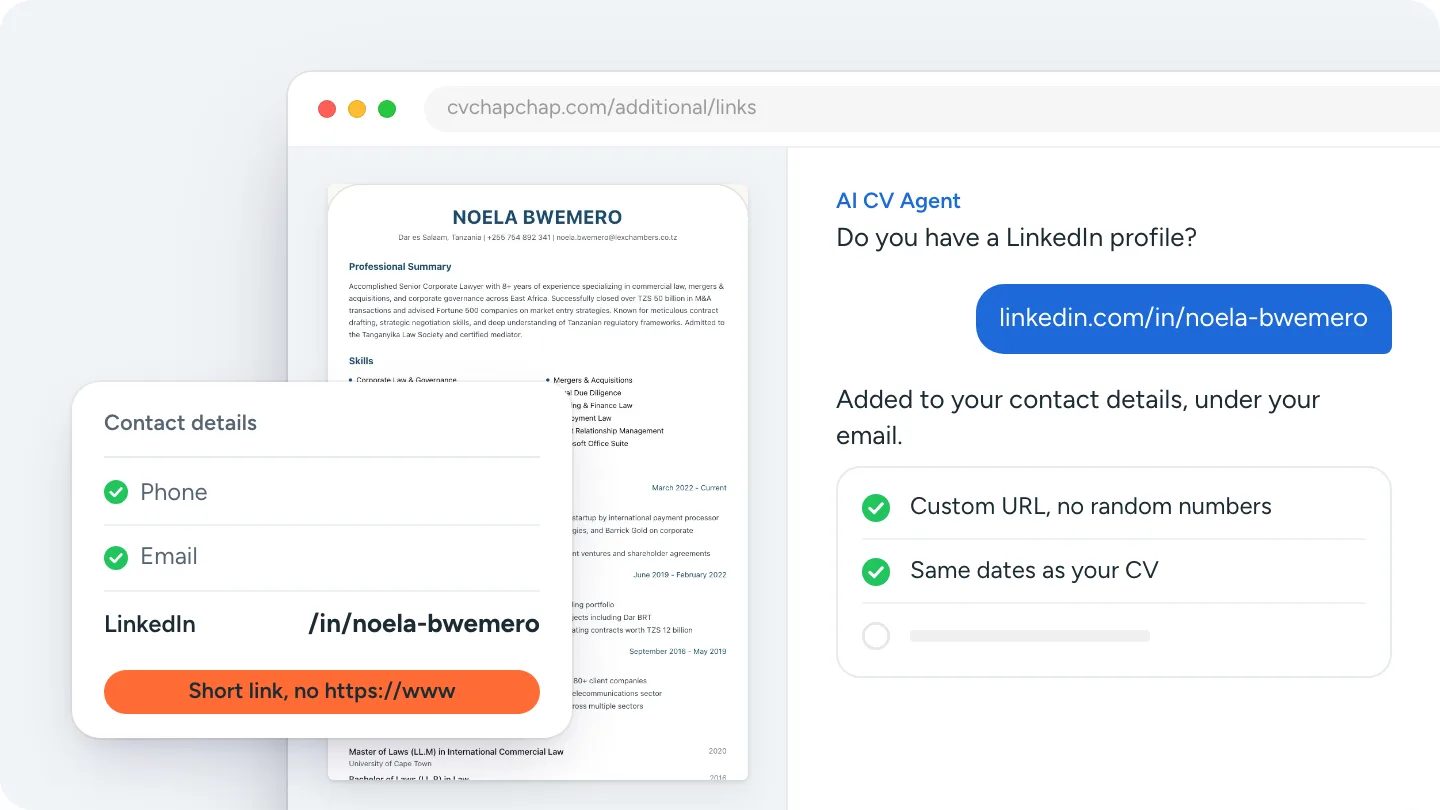
Short answer: to add LinkedIn to your CV, put your profile URL in your contact details, next to your phone number and email, in its short form: linkedin.com/in/your-name. Set a custom URL in LinkedIn first so it has no random numbers, leave out https://www., and make it a clickable link in your PDF.
This guide on how to add LinkedIn to your resume or CV covers whether you should, where the link goes, how to format it, and examples for different jobs.
Should you put LinkedIn on your CV?
Is it worth adding a LinkedIn link?
Yes, if your profile is complete and matches your CV. Recruiters often open a candidate's LinkedIn profile after reading the CV, to confirm dates and job titles and to see recommendations. A link saves them the search and makes sure they find the right person.
When should you leave LinkedIn off your CV?
Leave it off if your profile is nearly empty, out of date, or says something different from your CV. A profile with a photo, a headline and your last two jobs is enough to be worth linking; a profile with no experience listed is not. Fix the profile first, then add the link.
Where to put LinkedIn on a CV
In the contact details at the top, on the same line or block as your phone number, email and town. That is where recruiters and applicant tracking systems (ATS) look for it. Do not put it in the footer, in a separate "Social media" section near the end, or only as a LinkedIn icon with no text: some screening software cannot read an icon.
How to format your LinkedIn URL on a CV
What should my LinkedIn URL look like?
Short and readable: linkedin.com/in/firstname-lastname.
- On LinkedIn, open your profile and select Edit public profile and URL.
- Under Edit your custom URL, change it to your name (add a middle initial or your profession if your name is taken).
- Copy it to your CV without
https://www..
Should the LinkedIn link be clickable?
Yes. Most CVs are read on screen, so a clickable link in the PDF saves a recruiter from typing it. Keep the visible text short even when the link behind it is the full address.
LinkedIn on a CV: examples
These are fictional examples of a clean contact block.
Noela Bwemero · Senior Corporate Lawyer
+255 754 892 341 · noela.bwemero@email.com · Dar es Salaam
linkedin.com/in/noela-bwemero
Daniel Mwangi · Software Developer
+254 712 345 678 · daniel.mwangi@email.com · Nairobi
linkedin.com/in/danielmwangi · github.com/danielmwangi
Avoid these:
https://www.linkedin.com/in/daniel-mwangi-7b3a91254/: long, with random numbers.- "LinkedIn: click here": a recruiter reading a printed CV cannot click.
- A LinkedIn icon with no URL: unreadable for many ATS.
How to add LinkedIn in CV Chap Chap
In the step-by-step builder, open Additional, then Links, and add your profile URL; your first LinkedIn link goes into your CV's contact details. Every one of our 70 CV templates prints it, in the short linkedin.com/in/your-name form, so you can switch design on the preview page and the link stays. The AI CV Agent and CV upload also keep a LinkedIn link they find in your old CV.
Starting from LinkedIn itself? The LinkedIn resume builder turns your profile into a CV, link included.
Ready to build the CV your LinkedIn link sits on? Build your CV with the AI CV Agent.
Make the CV and the profile match
A link invites a comparison, so check the two agree: the same job titles, employers and dates, and a headline that fits the job you are applying for. Then, if you are applying through LinkedIn, see how to upload your CV to LinkedIn. For everything else that goes at the top of a CV, see how to write a CV.
That is how to add LinkedIn to your CV: a complete profile, a short custom URL in your contact details, and a link that works when clicked.
Frequently Asked Questions
Should I put LinkedIn on my CV?
Yes, if your profile is complete and matches your CV. Leave it off if the profile is nearly empty or out of date, and fix the profile first.
Where do I put my LinkedIn URL on my resume?
In the contact details at the top, with your phone number, email and town. Not in the footer and not as an icon only.
How do I format my LinkedIn URL on a CV?
Set a custom URL in LinkedIn (Edit public profile and URL) and write it as linkedin.com/in/your-name, without https://www.
Should the LinkedIn link on my CV be clickable?
Yes. Most CVs are read on screen, so a clickable link in the PDF helps. Keep the visible text short.
Does a LinkedIn link help with ATS?
A plain-text URL in your contact details is easy for an applicant tracking system to read. An icon with no text may not be read at all.
How do I add my LinkedIn link in CV Chap Chap?
In the builder, open Additional, then Links, and add your profile URL. Your first LinkedIn link appears in your CV's contact details on every CV Chap Chap template.
Ready to Create Your Professional CV?
Put these tips into practice. Build a stunning, ATS-friendly CV in under 3 minutes with CV Chap Chap.
Create Your CV Now